Chat → PDF
WhatsApp chat to PDF – without uploading it
No account, no subscription. Pay once and download right away.
or drop the file here
.txt or .zip from the WhatsApp export
No export yet? Here is how, in a minute ↓
Free preview · PDF from $2.99, one-time
- Processed locally
- No account needed
- One-time payment
Your chat is processed only on your device and never uploaded.
How to export your chat
iPhone
- Open the chat in WhatsApp and tap the name at the top.
- Scroll down and tap “Export Chat”.
- Choose the option with media to include photos (or “Without Media” for a smaller file).
- Tap “Save to Files” and save the ZIP file.
- Come back here and choose the file.
Android
- Open the chat in WhatsApp and tap ⋮ (top right).
- Tap “More”, then “Export chat”.
- Choose the option with media to include photos (or “Without media” for a smaller file).
- Save the file on your phone, e.g. to “Files”. If that option is missing, see the tip below.
- Come back here and choose the file.
No option to save the file? (e.g. Samsung)
Some Android phones only offer cloud services and apps when you export. This is how the file gets onto your phone without a cloud:
- Export the chat and choose WhatsApp in the list.
- Send the file to yourself: the chat with your own name. It travels end-to-end encrypted like any message.
- In Bubedi, tap “Choose chat export”. The file is in “My Files” under Internal storage → Android → media → com.whatsapp → WhatsApp → Media → WhatsApp Documents (possibly in the “Sent” subfolder).
Or: send the file to your computer or tablet with Quick Share or Bluetooth and open Bubedi there.
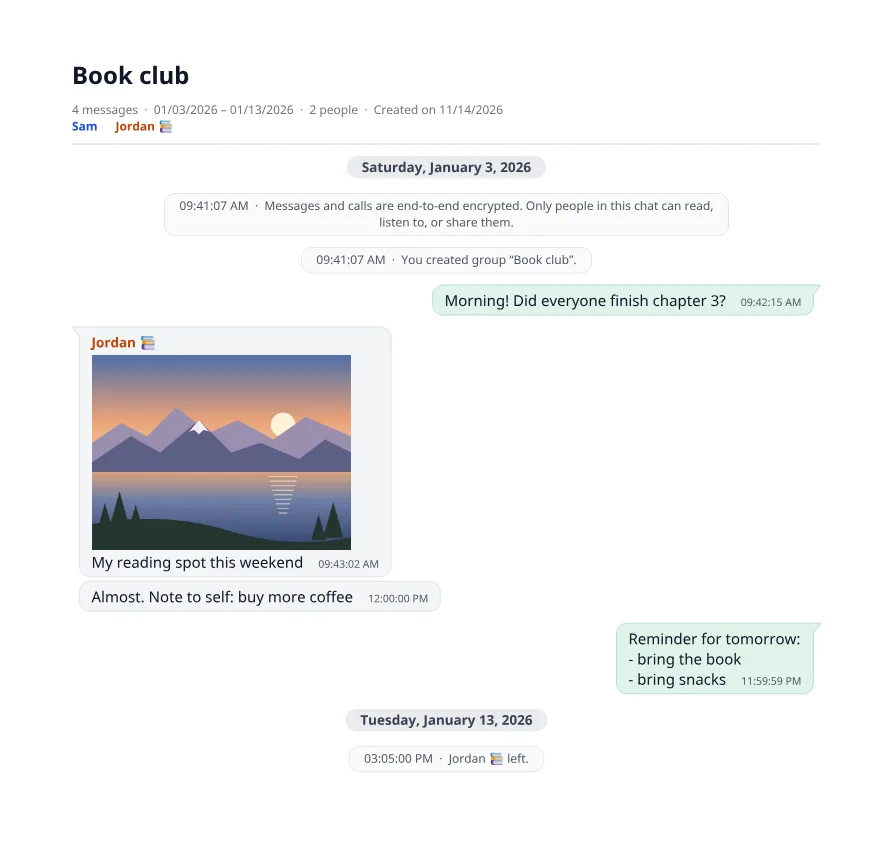
How it works
Export the chat
In WhatsApp choose “Export chat” and save the file.
See the preview
Choose the file here. The preview appears instantly in your browser.
Download the PDF
Pay once and your PDF is created right on your device.
Check it yourself: your chat stays on your phone
Open this page, switch on airplane mode and choose your chat: the preview still appears, because everything happens in your browser. You need the internet again only to pay, and even then only the size of the chat is sent, never its content.
How Bubedi compares
| Bubedi | Online converters with upload | Computer software | Screenshots | |
|---|---|---|---|---|
| Chat stays on your device | Yes | No, uploaded to a server | Yes | Yes |
| Works on the phone itself | Yes | Mostly | No, needs a computer and cable | Yes |
| No account | Yes | Account often needed | Licence needed | Yes |
| Photos, albums, stickers, colour emoji | Yes | Partly | Yes | Yes |
| Dates, senders and page numbers | Yes | Partly | Yes | No |
| Price | One-time from $2.99 | Often $7–15 or a subscription | Usually $30–60 | Free, but tedious |
Typical offers as of November 2026.
Questions & answers
Can WhatsApp save a chat as a PDF directly?
No. WhatsApp exports a chat only as a text file, or as a ZIP file with the media. Bubedi turns it into a readable PDF with chat bubbles, dates, senders and page numbers.
Is my chat uploaded?
No. The chat is only read in your browser and turned into a PDF there. It never leaves your device – not even during payment.
What does it cost?
The preview is free. The PDF is a one-time $2.99 up to 1,000 messages, $3.99 up to 10,000 and $4.99 for larger chats, taxes included. No subscription.
How do I pay?
Securely via Stripe with card, Apple Pay or Google Pay. We never see your payment details.
Does it work with iPhone and Android?
Yes. Exports from iPhone and Android are recognised, as .txt or .zip, in many languages and date formats.
Which languages and scripts are supported?
Chats in Latin, Greek and Cyrillic script (almost all European languages) plus emoji in colour. Chinese, Japanese, Korean, Arabic, Hebrew and Indic scripts are not shown yet – the preview lets you check your chat before you buy.
Are photos and voice messages included?
Yes, if you export the chat with media: photos and stickers appear inside the bubble, several photos sent together as an album. Videos and GIFs show a thumbnail, voice messages their length. Contacts and documents are listed with an icon and their name.
Does it work with group chats?
Yes. Every person gets their own colour, and system messages such as “added” or “left the group” are shown separately.
How do I save the export on a Samsung phone without a cloud?
Send the exported file to yourself in WhatsApp (the chat with your own name). You then find it in “My Files” under Android → media → com.whatsapp → WhatsApp → Media → WhatsApp Documents. The guide explains it step by step.
Why is “Export chat” missing?
Usually Advanced Chat Privacy is turned on for that chat, and then nobody can export it. Turn it off in the chat info and try again. On Android, “Export chat” is under ⋮ → “More”.
Why are older messages or photos missing?
WhatsApp does not export very long chats completely: according to WhatsApp, about the last 10,000 messages with media and about 40,000 without. It also only exports photos that are still stored on the device. Before you buy, the preview shows the date of the first message and warns you if photos are missing.
Can I have the chat printed as a book?
Yes. Choose “Chat book to print” in the preview: you get a print-ready PDF in book format (A5, A4, 6 × 9 in or US Letter) with a title page, contents, one chapter per month, page numbers and photos, for a one-time $9.99. A preview with a watermark is free. You order the printing yourself from a print shop of your choice; we do not print or ship anything.
Is the PDF legal evidence?
The PDF is a clear rendering of your export – for your records, your lawyer or an authority. It is not a certified document, and we cannot guarantee that a court accepts it as evidence.
What if something goes wrong?
Send us an e-mail (address below). If your PDF could not be created, we will find a solution or refund you.